Avionics — HRKULES
One board carries the sensing, the control, the recovery firing, the logging and the radio, and it is designed, built and tested in-house.
Telemetry packet50 per second
- Time
- Altitude
- Attitude
- Acceleration
- Temperature
- Battery
- Flight state
- Fault word
- Filter innovation
- Flags
- Sequence counter
- Version
Schematic: what a packet carries, not its layout.
-
01
One board
HRKULES is the flight computer: one board carrying sensing, control, recovery firing, logging and the radio. An RP2040 reads the IMU and the barometer, fuses them in an altitude Kalman filter, runs the state machine and both control loops, logs every cycle of flight to onboard flash and drives the gimbal servos and the pyro channel. All of it runs on a fixed 200 Hz schedule, and any cycle that overruns its slot is counted. Third board revision, laid out in KiCad.
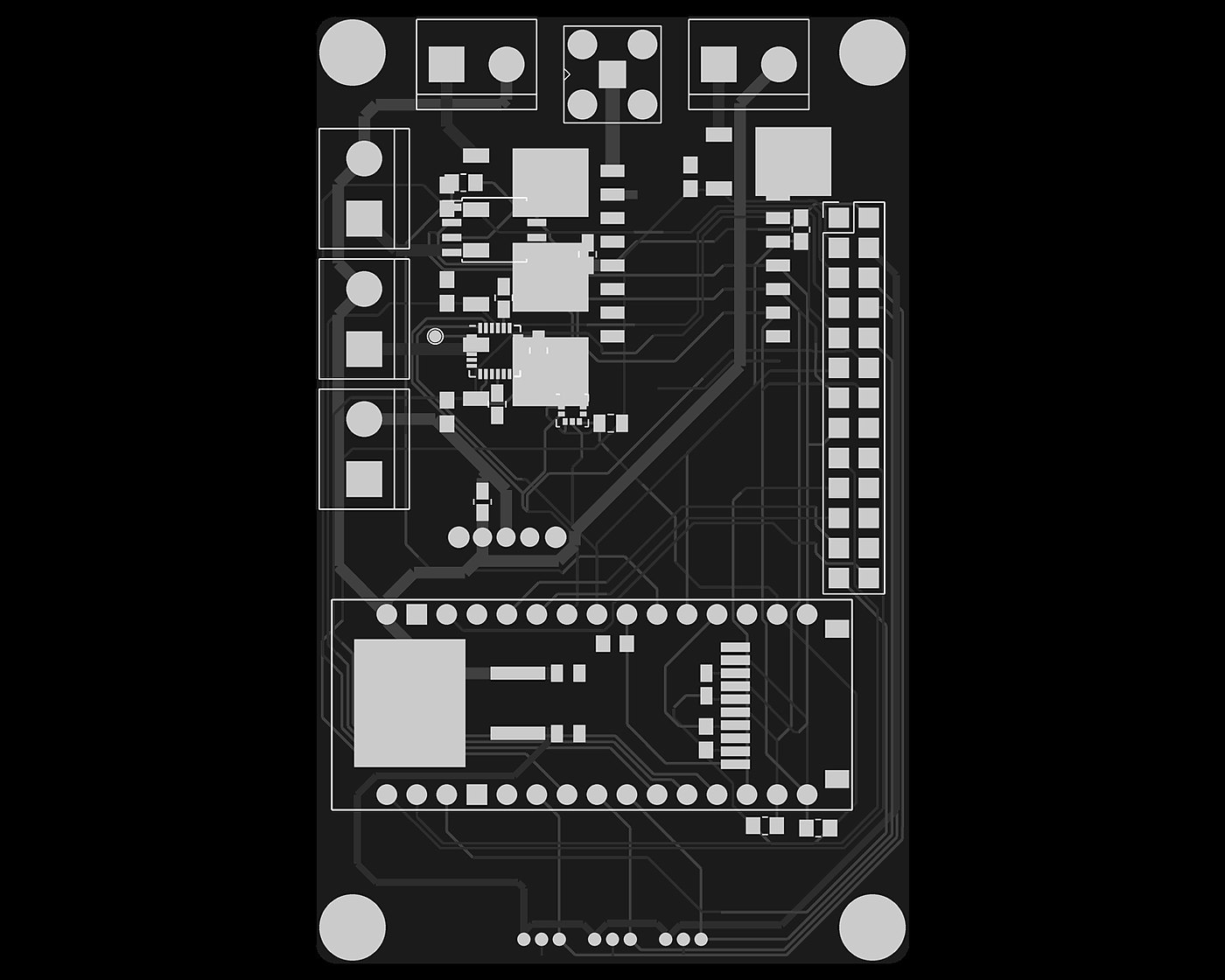
Fig. 2.2 — HRKULES · V3 board layout, 2.0 board on the bench, avionics bay -
02
A fixed 200 Hz loop
The whole flight computer runs on one fixed schedule: 200 passes per second. Each pass reads the sensors, lets the state machine decide, updates the estimator, runs the control loops and logs the cycle; telemetry goes out at a lower rate. The loop waits for its slot and advances the schedule by a fixed period, so the rate cannot drift, and every pass that overruns its slot is counted. After an overrun it resynchronises instead of running back to back to catch up, because a burst of passes would corrupt anything that integrates over time.
-
03
Telemetry
The radio driver is written directly against the RFM95W register map rather than against a library. Telemetry is one compact packet, 50 times a second: timestamp, state, altitude, three attitude angles, total acceleration, temperature, battery, a fault word, a filter-innovation value, a flags byte, a sequence counter and a version byte. The packet size is checked when the firmware is built, so a changed layout fails the build instead of corrupting the downlink, and the ground derives packet loss from the sequence counter.
-
04
Logging
Every cycle of flight is written to a flash chip on the board. After touchdown the log is copied to the SD card, so nothing is lost when the battery is unplugged and the data opens straight in the Data Viewer. If a log is still on the chip at the next power-up, it is copied to the card first.
-
05
Configuration at the pad
Tunables are read from a config file on the SD card at boot rather than compiled in, so the vehicle can be retuned at the pad without a toolchain. Each value is checked against a range the vehicle is willing to fly. A missing file, an unknown key or a mistyped value leaves the compiled-in default in place.
-
06
Faults and the start-up gate
Faults are tracked twice: the ones live right now, and every one seen at any point since boot. A fault that comes and goes is invisible in the live view, which is why the latch exists. If a flight-critical subsystem fails at start-up the main loop never runs and the status LED blinks: the vehicle stays on the pad instead of flying on unreliable data.
-
07
Specification
- Revision
- V3 (V1 → V3)
- MCU
- RP2040 @ 133 MHz · Arduino Nano RP2040 Connect module
- IMU
- MPU6050 — 6 axis
- Barometer
- BMP180
- Estimator
- Kalman filter, barometer + accelerometer
- Main loop
- 200 Hz, fixed schedule
- Radio
- RFM95W · 433 MHz band
- Storage
- W25Q flash (flight) · SD (config, post-flight copy)
- Outputs
- 2 servo channels (gimbal) · 1 pyro channel
- Telemetry
- compact, versioned packet · 50 Hz
Altitude estimate
Altitude and vertical velocity come from a two-state Kalman filter. The accelerometer drives the prediction at 200 Hz; the barometer corrects it whenever a fresh sample lands. Each barometer sample is checked against the filter's own uncertainty: a sample that is statistically implausible is rejected, and only a sustained run of rejections makes the filter re-anchor to the barometer. A single bad sample cannot move the estimate, but a filter that has genuinely drifted recovers on its own.